

If you establish Pennsylvania residency while holding a commercial driver’s license from another state, PennDOT requires you to obtain a Pennsylvania CDL within 30 days. The transfer is completed in person, and you must surrender every valid out-of-state license before Pennsylvania can issue the new credential.
This guide explains the required forms, original documents, medical-status review, current fees, endorsement issues, and final checks that help a new resident complete the transfer without an avoidable second visit.

Pennsylvania CDL Transfer Requirements at a Glance
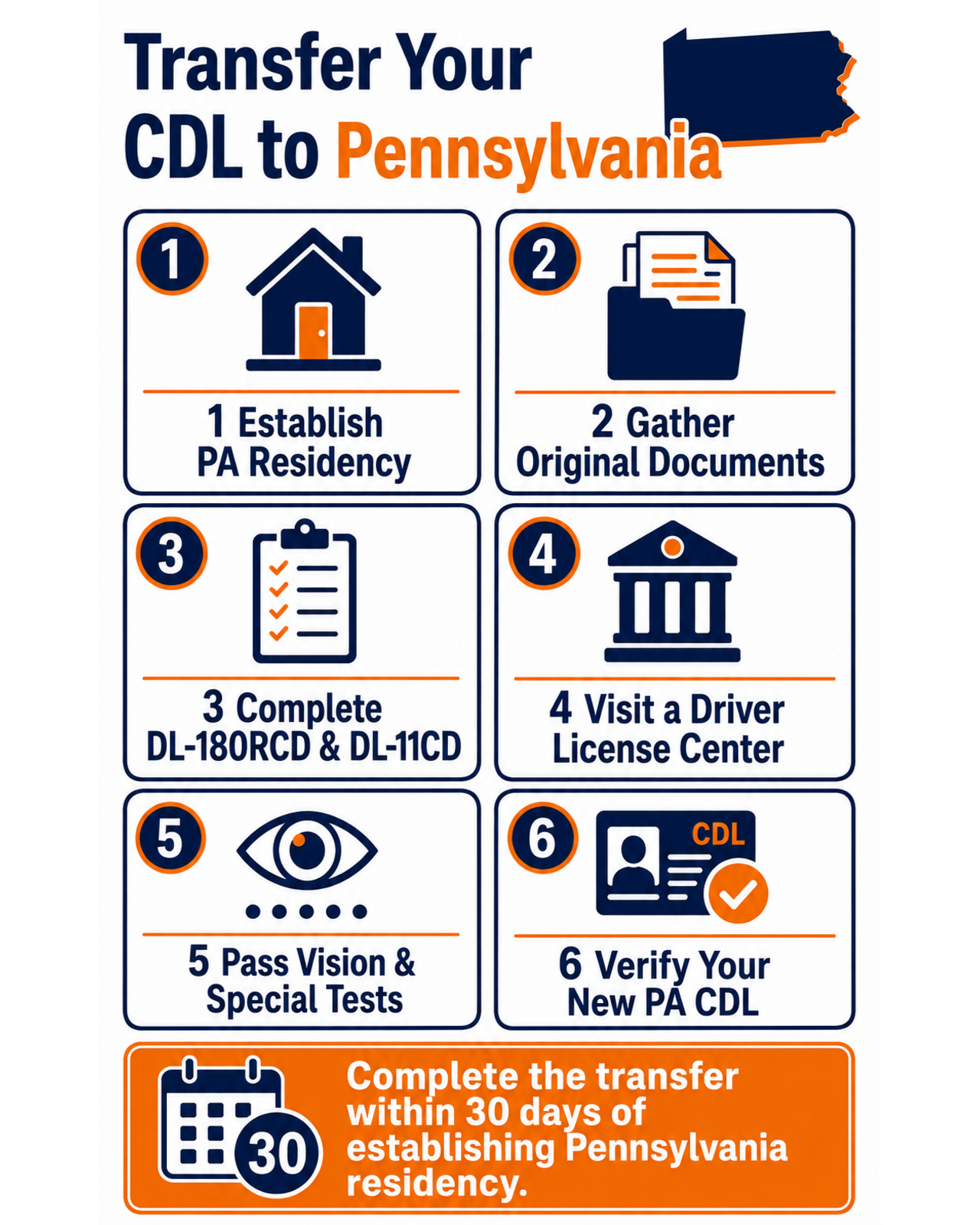
says a new Pennsylvania resident must transfer an out-of-state CDL within 30 days of establishing residency. The applicant must appear at a Driver License Center, surrender all valid licenses, complete DL-180RCD and DL-11CD, pass a vision screening, present the required original documents, and pay the applicable fee.
| Transfer requirement | What to prepare | Why it matters |
|---|---|---|
| 30-day deadline | Use the date Pennsylvania residency was established | Commercial drivers have a shorter transfer window than non-commercial drivers |
| In-person application | Visit a PennDOT Driver License Center that processes driver licensing transactions | The CDL transfer cannot be completed entirely online |
| Surrender old credentials | Bring every valid out-of-state driver license or commercial learner’s permit in your possession | Federal law permits only one valid driver license |
| State forms | DL-180RCD and DL-11CD | PennDOT uses them to create the Pennsylvania CDL and record the driving category |
| Original documents | Identity, Social Security, Pennsylvania residency, and name-change documents when applicable | Names and dates of birth must match or be connected by legal records |
| Vision screening | Bring corrective lenses if used for driving | A restriction may be added when correction is required |
| Driver-record review | Disclose all states where licensed during the requested history period | Outstanding violations or sanctions can delay or prevent issuance |
Review the broader CDL eligibility and medical framework before the visit. A state transfer does not erase a suspension, disqualification, medical downgrade, Clearinghouse prohibition, or vehicle restriction.
Who Can Transfer an Out-of-State CDL to Pennsylvania?
This process is for a driver who already holds an out-of-state CDL and has established Pennsylvania residency. The CDL should be valid or have expired no more than six months before the application. The current states that an out-of-state license expired for more than six months cannot be transferred.
You must surrender every valid license
A driver cannot keep the old state CDL as a second active credential. Bring the physical out-of-state license and any other valid license or commercial learner’s permit in your possession. PennDOT uses interstate driver-record systems to review the prior record and transfer the commercial privilege to Pennsylvania.
Returning Pennsylvania residents use the same documentation standard
A previous Pennsylvania resident moving back must still meet the identity and residency rules applied to a new resident. An old Pennsylvania record number can help PennDOT connect the histories, but it does not replace the current documents.
A transfer is not a fresh start
PennDOT reviews the driver histories identified on the application. The DL-180RCD warns that outstanding violations in another state or jurisdiction may cause denial, cancellation, recall, or a Pennsylvania sanction. Resolve unpaid citations, reinstatement requirements, conflicting identity data, and duplicate records before relying on the new CDL for work.
Forms and Original Documents to Bring
identifies DL-180RCD and DL-11CD as the core forms. It also instructs applicants to bring the out-of-state license, proof of identity and residency, a Social Security card, any original name-change records, and the correct payment.
| Document | Purpose | Pre-visit check |
|---|---|---|
| DL-180RCD | Application for a Pennsylvania CDL by an out-of-state CDL driver | Complete every applicable history, class, endorsement, restriction, and certification field |
| DL-11CD | Commercial driver self-certification | Select the category that matches the transportation you actually perform |
| Valid out-of-state CDL | Shows the credential being surrendered and transferred | Check expiration, class, endorsements, restrictions, name, and date of birth |
| Proof of identity | Establishes lawful identity and status | Use an original or qualifying certified document from PennDOT’s current list |
| Social Security card | Supports identity verification and CDL record matching | Bring the original; confirm the name matches the application |
| Two proofs of Pennsylvania residency | Establish the current physical Pennsylvania address | Use current documents bearing the same name and address |
| Name-change documents | Connect different names across identity and license records | Bring original or certified marriage, divorce, or court records as applicable |
| Medical documentation, when required | Supports non-excepted commercial driving status | Verify PennDOT can see the current medical certification electronically |
| Payment | Covers the selected CDL product and options | Confirm the current amount and accepted method before the visit |
Make every name and birth date consistent
The most common document problem is not a missing piece of paper but a mismatch. Compare the CDL, Social Security card, passport or birth certificate, residency documents, and application line by line. If a legal name changed, carry the complete documentary chain connecting the former name to the current one.
Bring originals, not phone photos
The DL-180RCD document instructions require original immigration and identity records in applicable cases and state that photocopies are not accepted for those listed items. Do not expect a screenshot, scan, or ordinary photocopy to substitute for an original or certified copy where PennDOT requires one.
How to Transfer Your CDL to Pennsylvania Step by Step
- Mark the residency date. Record when you established Pennsylvania residency and count the 30-day commercial-license transfer window from that date.
- Inspect your current CDL. Note the class, endorsements, restrictions, medical notation, expiration, legal name, and address. Photograph both sides for your records before surrendering it.
- Resolve record problems. Contact the issuing state about an active suspension, unpaid reinstatement requirement, incorrect name, or duplicate record before the Pennsylvania visit.
- Complete DL-180RCD. List prior licenses and request the class, endorsements, and restrictions that should appear on the Pennsylvania CDL. Do not leave history questions unanswered.
- Complete DL-11CD. Choose interstate or intrastate and excepted or non-excepted status based on the operation you perform—not simply where your employer is located.
- Verify medical status. If you drive in a non-excepted category, confirm the current Medical Examiner’s Certificate is properly associated with your CDL record and will remain valid after transfer.
- Gather original documents. Put the out-of-state CDL, identity document, Social Security card, two residency proofs, name-change chain, medical information, and payment in one folder.
- Check endorsement-specific rules. HazMat and school bus privileges have additional transfer conditions. Confirm them before visiting so you can decide whether to keep or temporarily drop an endorsement.
- Visit a PennDOT Driver License Center. Complete the vision screening, surrender the old credentials, submit the forms and documents, and pay the correct fee.
- Review the temporary or issued product. Verify every printed class, endorsement, restriction, name, address, and expiration before leaving or as soon as the credential arrives.
Medical Certification and CDL Self-Certification
Every CDL holder must tell the state what kind of commercial operation they perform. The four federal categories are Non-Excepted Interstate (NI), Non-Excepted Intrastate (NA), Excepted Interstate (EI), and Excepted Intrastate (EA). The category controls whether federal or state medical certification must be maintained.
A transfer does not automatically correct an old self-certification choice. Review the routes, cargo, employer, vehicle, and exceptions that apply to your real job. If non-excepted medical certification is required, confirm the examiner is listed on the National Registry and the examination result is available to the licensing system.
| Status issue | Why it can delay the transfer | Action before the visit |
|---|---|---|
| Medical certificate near expiration | The new record may become not-certified soon after issuance | Schedule the examination early enough for electronic reporting |
| Name or CDL number mismatch | The medical record may not match the driver record | Ask the examiner to use the exact license and identity information |
| Wrong self-certification category | PennDOT may request a certificate that does not match the declared operation | Review the definitions before completing DL-11CD |
| Existing downgrade | The old state may no longer show active commercial privileges | Resolve the medical status with the issuing state before transferring |
For a detailed decision framework, review the guide to Pennsylvania CDL self-certification categories.
What Happens to Endorsements and Restrictions?
Do not assume every letter will copy automatically. DL-180RCD includes fields for the commercial class, endorsements, medical restrictions, and common federal restrictions such as L, E, O, and Z. Compare the requested Pennsylvania privileges with the front and back of the old CDL before signing.
| Credential item | Transfer concern | What to verify |
|---|---|---|
| Class A, B, or C | The Pennsylvania class must match the verified prior privilege | Class letter and any vehicle limitations |
| P, S, N, T, or X endorsement | Supporting state or federal requirements may apply | Every endorsement appears correctly after transfer |
| H endorsement | Knowledge testing and TSA assessment validity receive special review | Complete the separate HazMat transfer path |
| E restriction | Limits operation to vehicles without a manual transmission | Do not expect a transfer to remove it |
| L or Z restriction | Limits air-brake operation | Confirm the exact brake-system qualification |
| O restriction | Limits Class A operation involving a tractor-trailer with a fifth-wheel connection | Transfer the record accurately; removal requires the appropriate retest process |
If the Pennsylvania CDL omits a privilege or adds a restriction unexpectedly, address it promptly with PennDOT. Operating equipment beyond the credential shown on the new CDL is not justified by a photocopy of the old license or an employer’s assumption.
Special Rules for Transferring HazMat
HazMat is the major exception to a routine administrative transfer. require the 30-question Pennsylvania HazMat knowledge test and verification of federal TSA approval. The security threat assessment must remain valid through the expiration date of the new Pennsylvania CDL; otherwise, a new assessment is required before H can be retained.
If you do not pass the HazMat knowledge test on the first attempt, PennDOT says you must return another day to try to retain H. Because the 30-day CDL transfer deadline still applies, a driver may transfer the base CDL without HazMat and add H later. That choice may interrupt work involving placardable hazardous materials, so coordinate with the employer before the visit.
HazMat transfer mini-checklist
- Confirm that H or X is currently active on the out-of-state CDL.
- Check the TSA threat-assessment validity period.
- Study the current Pennsylvania hazardous-materials section.
- Bring the additional identity/status documents required for the federal process.
- Allow time for a new assessment and fingerprints if the current approval is not long enough.
- Do not transport placardable HazMat unless H or X appears on the valid Pennsylvania CDL.
The full application sequence is covered in the Pennsylvania HazMat endorsement guide.
Pennsylvania CDL Transfer Fees and Payment
, reviewed August 8, 2026, lists the following commercial out-of-state products. Verify the amount again immediately before applying because fees and selected options can change the total.
| Commercial out-of-state product | Posted fee | Notes |
|---|---|---|
| Four-year CDL | $127.50 | Standard commercial out-of-state new-driver product |
| Two-year CDL for eligible drivers age 65+ | $71.50 | Optional shorter product for qualifying applicants |
| Four-year CDL with motorcycle | $133.50 | Includes the requested motorcycle privilege |
| Two-year CDL with motorcycle for eligible drivers age 65+ | $77.50 | Shorter commercial product with motorcycle |
| Four-year CDL with HazMat | $149.50 | Federal security-related charges may also apply |
| Two-year CDL with HazMat for eligible drivers age 65+ | $93.50 | HazMat eligibility and federal approval still apply |
PennDOT Driver License Centers accept debit cards, credit cards, checks, and money orders but do not accept cash. The DL-180RCD should reflect the selected license duration and privileges so the payment matches the requested product.
Out-of-State CDL to Pennsylvania Transfer Checklist
- □ I recorded the date I established Pennsylvania residency
- □ I will complete the CDL transfer within 30 days
- □ My out-of-state CDL is valid or expired no more than six months
- □ I identified every state where I previously held a driver license
- □ I resolved any suspension, disqualification, or conflicting driver record
- □ I completed the current DL-180RCD form
- □ I completed DL-11CD using the correct self-certification category
- □ I confirmed my medical certification status when required
- □ I have my original out-of-state CDL and any other valid license or CLP
- □ I have an acceptable original identity document
- □ I have my original Social Security card
- □ I have two acceptable proofs of my current Pennsylvania address
- □ I have the complete legal name-change document chain, if applicable
- □ I reviewed every class, endorsement, and restriction that should transfer
- □ I completed the separate HazMat preparation if retaining H or X
- □ I brought corrective lenses for the vision screening, if used
- □ I confirmed the current fee and brought an accepted payment method
- □ I will inspect the new CDL before driving commercially
Frequently Asked Questions
How long do I have to transfer my CDL after moving to Pennsylvania?
PennDOT requires a new resident with an out-of-state CDL to obtain a Pennsylvania CDL within 30 days of establishing residency. Do not use the 60-day period that applies to many non-commercial license transfers.
Can I transfer an out-of-state CDL online?
No. PennDOT requires the CDL holder to appear in person at a Driver License Center, surrender all valid out-of-state licenses, pass a vision screening, submit DL-180RCD and DL-11CD, present the required documents, and pay the fee.
Will my HazMat endorsement automatically transfer to Pennsylvania?
No. To retain HazMat, PennDOT requires the 30-question Pennsylvania HazMat knowledge test and verification that the TSA security threat assessment remains valid through the expiration of the new CDL. A new assessment may be required.
Can Pennsylvania transfer a CDL that expired more than six months ago?
The current DL-180RCD states that out-of-state licenses expired for more than six months cannot be transferred. Contact PennDOT for the licensing and testing path that applies to an older expired credential.
Educational information only. Forms, fees, accepted documents, medical reporting, endorsement-transfer rules, and federal security procedures can change. Confirm your individual record and transaction with PennDOT, FMCSA, and TSA before surrendering a license or driving commercially. Official sources reviewed August 8, 2026.